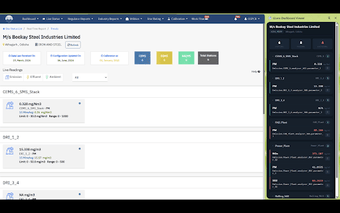
GLensDebugger: In-browser inspector for GLens environmental APIs
GLensDebugger, developed by Knowledge Lens, is a Chrome extension for inspecting GLens siteinfo API responses in industrial environmental monitoring. The tool intercepts and parses complex JSON payloads and presents readable environmental metrics inside Chrome's side panel so engineers can verify live data without switching tabs. It decodes emissions, effluent, and air-quality datasets automatically. Intended for environmental engineers, technicians, and developers working directly with GLens integrations in operational monitoring projects.
It surfaces GLens siteinfo responses as parsed, technical metrics
GLensDebugger intercepts siteinfo API responses and converts otherwise dense JSON into readable fields engineers expect, such as emissions values and air-quality readings. The extension targets the GLens siteinfo API specifically and performs automatic parsing of complex datasets, which reduces the manual work of decoding nested payloads during integration testing. This makes it easier to confirm that telemetry fields map to the correct monitoring channels.
It keeps validation in-context so technicians stay on their current page
Side panel integration displays parsed output alongside the active tab, so users can review data without navigating away from dashboards or regulatory portals. The extension performs real-time interception, updating parsed entries as API responses arrive. That design supports quick verification during live testing and troubleshooting, helping teams check incoming feeds while keeping their operational view intact.
Its scope is intentionally narrow, which limits applicability
The extension only targets GLens siteinfo responses, so it does not act as a generic API inspector across unrelated services. That focused approach suits teams using the GLens platform but means the tool provides little value for broader web debugging tasks or for engineers working with different IoT APIs. The user base is small and professional, reflecting its role inside environmental compliance workflows.
Deployment fits desktop Chrome environments used in industrial projects
The extension runs in Chrome on PC, macOS, and Linux, aligning with common desktop setups in engineering teams. It is not described as available for other browsers or as a standalone app, so teams that standardize on non-Chrome browsers cannot use it. Integration into existing GLens deployments is straightforward for those already operating within that ecosystem.
GLensDebugger is a focused diagnostic tool for GLens integration teams
The extension delivers targeted operational value to engineers and developers who need fast, in-browser validation of GLens monitoring feeds; its narrow focus creates a clear trade-off, offering high utility inside GLens deployments and limited usefulness outside that ecosystem. Teams that rely on GLens data streams gain a practical verification aid, while groups without GLens infrastructure should look elsewhere for a general API inspector.